ROS2 Security Guidelines
Definition
Adhere to ROS2 security guidelines and best practices to ensure secure coding, minimizing vulnerabilities within the ROS2-based robotic software.How it works
ROS 2 (Robot Operating System 2) security guidelines provide a framework for securing robotic systems. They emphasize authentication, authorization, encryption, and secure communication. User roles and permissions are defined, limiting access to sensitive resources. Transport layer security ensures encrypted communication. ROS 2 supports end-to-end security, securing data across communication channels. Guidelines also address secure development practices, encouraging secure coding and regular updates. Adherence to these guidelines helps prevent unauthorized access, data breaches, and tampering in robotic systems, ensuring the integrity, confidentiality, and availability of critical operations in the field of robotics. Please refer to our Advisory Report for detailed information about how to make sure your ROS2 environment is protected.Setting up your SROS2 Environment
SROS2, also known as Secure ROS2, is a default add-on package that is automatically installed when downloading ROS2, but is not enabled by default. By following the steps below, you can make sure your environment is secure by using authentication and encryption.The first step is to set the ROS2 environment variable “ROS_AUTOMATIC_DISCOVERY_RANGE” to ‘OFF’ to disable discovery.
The next step is creating a folder to store all the files we will be using.

Once you've done that you want to use the SROS2 utilities to generate the keystore

Once the keystore is created, create keys and certificates for each node with security enabled.

To make sure the middleware can locate the encryption materials and enable (and possible enforce) security, we need to set the following environment variables to the following:

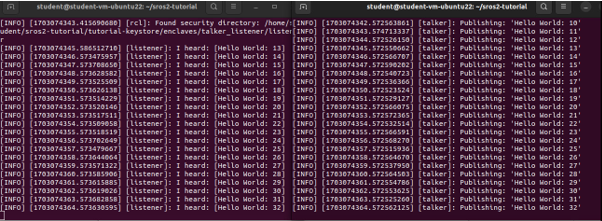
To validate if it's done correctly you can start your nodes:


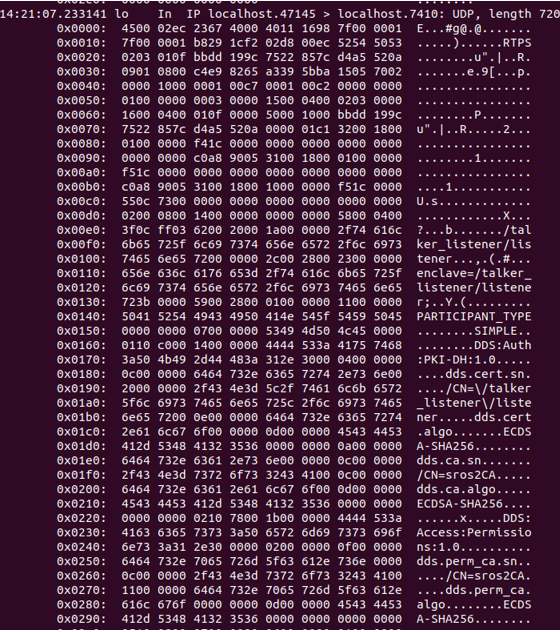
These nodes will be communicating using authentication and encryption! If you look at the packet you can see that the messages are encrypted.
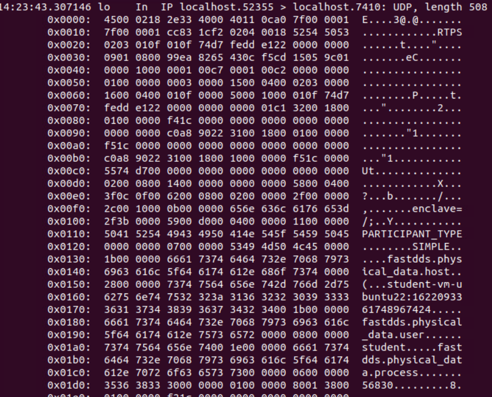
If an attacker managed the capture a package without encyption disabled it would look like this:
Instead, our now encrypted package will look like this:
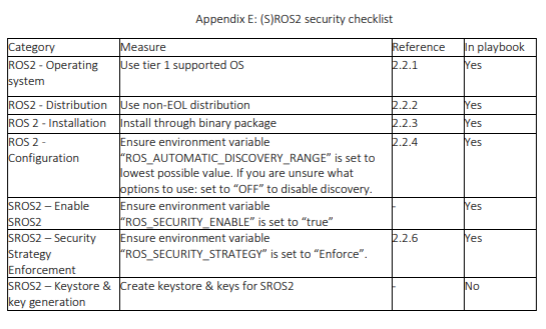
Following the checklist below should give you a quick overview on what settings and variables need to be changed to make sure SROS2 is enabled:
Please refer to our Advisory Report for detailed information about how to make sure your ROS2 environment is protected.
Considerations
- Follow ROS 2 secure coding practices and guidelines.
- Regularly update ROS 2 packages to address security vulnerabilities.
- Implement proper access controls for ROS 2 nodes and communication.